Profiles V3
The new profile is built out of blocks you add, name, drag around, and style. This page covers the editor, the style options, snippets and looks, and the CSS classes if you'd rather write your own.
Turning it on
Flip Use the new profile layout on your preferences page. Your old profile isn't deleted. Turn the setting back off and it's exactly where you left it, custom CSS and all.
Only your own profile changes. Everyone else's stays on whichever version they picked.
The editor
Open your profile and click Edit profile. A bar appears at the bottom of the page and stays there while you work.
- Add section
- Opens the block gallery at the top of the page.
- Drag handle
- Grab it to move a block, including from one column to the other. The new order saves as soon as you let go.
- Pencil
- Opens that block's settings.
- Columns
- One, two, or three. Three needs Minimal view; with the site navigation on there isn't room, so the third column's blocks sit under the second until you turn it back on.
- Style
- Colors, background, pictures, cards, fonts, links, and a few extras. Changes show on the page as you make them.
- Advanced CSS
- Opens a panel with three tabs: your own CSS, your snippets, and looks.
- Minimal view
- Drops the site navigation and sidebar from your profile, leaving a slim bar with a link back to Subeta.
- View as visitor
- Shows your profile the way someone else sees it: the comment box, the gift and friend buttons, the mail icon. Nothing on it sends, so click around freely.
- Done editing
- Back to the normal view. Anything you typed in the Style panel or the Code tab and didn't save gets saved on the way out. A snippet or look you're still filling in needs its own Save button.
Blocks
Blocks go in columns. The default is two: a wide one on the left and a 292px one on the right. One column stacks everything, and three splits the page evenly. Most blocks can be used once. Six can be added as many times as you like.
You can have more than one
Wishlist, Collections, Pets, Stickers & More, Image, and Text block repeat. Add a Wishlist block per category, a Collections block per collection, a Pets block for the pets with one tag, and as many text blocks as you have things to say. The gallery marks these "add another".
| Block | Shows | You control it from |
|---|---|---|
| About | Your intro text, sCode and all. | The block's own settings. |
| Text block | Anything you write. | The block's own settings. Repeatable. |
| Image | One to three pictures you upload, side by side. | The block's own settings. Repeatable. |
| Pets | Your pets and their art. | Pet order decides which come first. |
| Outfits | Outfits you've shared. | Share and pin them in your wardrobe. |
| Wardrobe | The look you have on right now, and optionally the items in it. | Your current avatar. |
| Collections | One collection: plushies, trading cards, beanbags, pumpkins, pastries, or tiles. | The block picks the collection. Repeatable. |
| Wishlist | Everything on your wishlist, or one category of it. | Categories come from your wishlist page, and only public ones show up. Repeatable. |
| Shops & Galleries | A gallery you've made. | Make one on My Shops, then pick it in the block's settings. |
| Stickers & More | Your stickers, bobbleheads, or minions. | Stickers follow the order in your Sticker Album. Repeatable. |
| Achievements | Achievements you've favorited. | Favorite them on the achievements page. |
| Medals | Medals and trophies you've earned. | Earned automatically. |
| Garden | A snapshot of your garden. | Your garden and its privacy setting. |
| Recent Topics | Forum topics you started. | Public forums only. |
| Recent Posts | Your recent forum replies. | Public forums only. |
| Activity | Your feed, with reactions. | Friend Feed settings decide what's public. |
| Friends | Your friends, favorites first. | Favorite people on your friends list. |
| Comments | Your profile comments and the box to leave one. | The block sets who can comment. |
| Holiday | The seasonal action for whatever event is running. | Appears on its own during an event. |
Block settings
Click the pencil on any block. Every block has a Title, which you can call whatever you want, so "Wishlist" can read "things I'm hunting". Every block also has a Header style: Filled, Pill, Underline, Minimal, or No header. It's set per block, so they don't all have to match. You can pick an Icon for beside the title, and how big it is, too.
Frame is Card or No frame. No frame drops the block's background, border, and padding, so what's inside sits right on your page. While you're editing, a block with no frame or no header still shows a dashed outline and its pencil so you can find it.
Most blocks have an Items shown slider. The rest depends on the block:
- About gives you a text box for your intro, up to 5,000 characters.
- Text block gives you the full editor, with BBCode and a preview.
- Image holds up to three pictures, a height from 100px to 400px, and a fit: fill the space and trim the edges, or show the whole picture. Each picture gets a description for people using screen readers. Its Width can be one, two, or three columns: a wider block sits at the top of the columns it covers, and any other column runs down beside it.
- Pets picks which ones: your pet order, pets you choose, or pets with a tag. It also sets pets per row and whether to show the full image or a headshot.
- Shops & Galleries picks the gallery to feature and whether to show its description.
- Stickers & More picks stickers, bobbleheads, or minions.
- Wardrobe shows or hides the list of items you're wearing.
- Collections picks which collection this one shows.
- Wishlist picks all items or one of your public categories.
- Comments sets who can leave one: Everyone, Friends only, or Closed.
Your header
The header sits at the top and can't be moved or removed. The pencil on it does two things.
It picks which stats show. Pets, achievements, posts, member since, and the online dot can each be hidden.
It also pins your intro into the header. Turn that on and your About text fills the space beside your avatar instead of sitting in its own block further down, and the About block hides itself so the same text isn't printed twice.
Style options
The Style button covers the common changes without any CSS. Every control previews on the page as you move it, and Reset clears the lot and puts you back on your site theme.
Presets
Five starting points. Pick one and then change whatever you want.
- Clean sets nothing at all, so you get your site theme untouched.
- Peka Glade is sage into moss behind frosted cards.
- Vesnali runs soft spring colors across the page behind frosted cards.
- Sacred Lands is a solid sandstone page with white cards and a terracotta accent.
- Darkside is a solid near-black page with dark cards, a red accent, and light text.
Accent color
One color, used by section headers, links, and borders. It sets
--color-primary for your profile only, so it holds no
matter which site theme your visitor is browsing in.
Page background
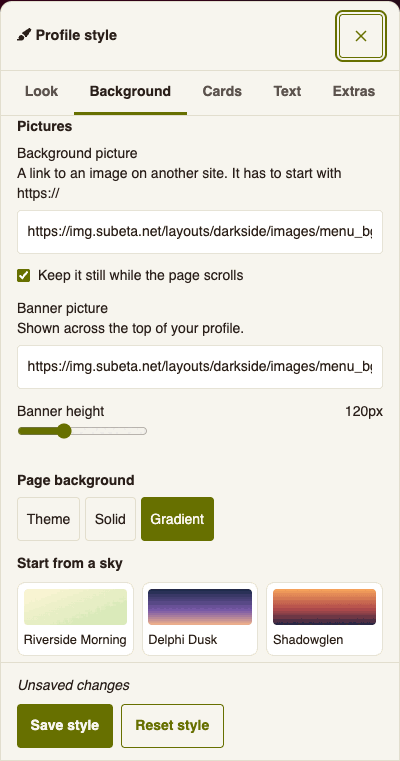
Your theme's own background, one solid color, or a gradient. The gradient builder takes up to six colors on a bar and draws them as a straight line, a circle, or a sunburst. It has six skies to start from. Light backgrounds fill the whole window. Dark cards keep the background inside the content area so it doesn't fight the site navigation; in Minimal view it takes the whole page.
Pictures
Paste a link to a background picture, a banner, or both. The link
has to start with https:// and point straight at an
image on a public site. If it doesn't, the editor says so and leaves
the picture off. For the banner you can also click
Upload a picture instead of pasting a link.
- A background picture fills the whole window, on top of any color or gradient you picked. Keep it still while the page scrolls is on by default. Visitors who have reduced motion turned on always get a still picture.
- A banner picture runs across the top of your profile, above the header. Its height goes from 60px to 400px, and it gets shorter on phones so it stays in proportion.
Uploading pictures
The banner and the Image block take JPG, PNG, GIF, and WebP pictures. GIFs stay animated, up to 300 frames.
- Each picture is shrunk to the size it's shown at when you upload it.
- After that it can be up to 3 MB, or 10 MB with a Gold Account.
- You can have 20 pictures on your profile at once.
- A picture you upload but never save to your profile is deleted after a day.
Cards
The surface behind every block: your theme's color, white, one of two glass strengths, or dark. Pick a glass one with a background set and the cards blur what's behind them. Pick the dark one and the text flips light to stay readable.
Shape
Three sliders, all on the Cards tab. Page width runs from 520px to 1100px. Corners runs from square (0px) to 20px. Card opacity runs from 100% down to 40%, so a background shows through the cards. Each one starts on your theme's own setting and only saves once you move it.
Top bar
The bar across the top in Minimal view takes its own color. The text and logo on it switch between light and dark to stay readable.
Font
Pick the site default or one of 22 fonts in five groups: Sans-serif, Serif, Playful and fantasy, Handwriting, and Typewriter and retro. Each tile shows its font's name in its own face. Georgia, Palatino, Comic Sans, Impact, Cursive, and Monospace are system fonts. The rest come from Google Fonts and only load on profiles that use them. The font applies to everything inside your profile. For anything else, load a webfont in Advanced CSS. Text size scales every piece of profile text from 100% up to 150%.
Links
Link color sets the color of links in your profile. Leave it alone and they use your accent color. Link style is Underlined, Dotted underline, or Underline on hover. Buttons keep their own colors.
Cursors, drifting shapes, and glow
The Extras tab has ten cursors: a sparkle, a star, a wand, a paw, a quill, a heart, a ghost, a leaf, a mushroom, and a moon. Visitors see yours while their mouse is over your profile. It's drawn in your accent color, or in gold if you haven't picked one.
Drifting shapes move across the page: stars, snow, leaves, petals, clovers, acorns, bubbles, hearts, music notes, bats, butterflies, or clouds. Stars, snow, and acorns fall, leaves and petals sway on the way down, bubbles and hearts rise, and bats and clouds cross the page. Behind cards keeps them under your sections, and see-through cards let them show. Over everything lets them drift across your text too. They stay still for visitors who have reduced motion turned on.
Glow puts a soft light around your name and your section titles.
Between sections
Also on Extras: nothing, a vine, stars, or stitches drawn between your blocks.
Advanced CSS
The Advanced CSS button opens a panel with three tabs. Code is an editor whose rules apply to the whole page, the blocks included. Anyone who visits your profile sees it. Snippets and Looks are covered below.
- Preview applies what you've typed without publishing it. Click it again to drop back to what's saved.
- Your CSS runs after the Style panel's settings, so it wins where the two disagree. Snippets you switch on run after it.
- Emptying the box and saving clears it.
- Your site-wide Custom CSS does not run here, and neither does a visitor's, so nobody can repaint your profile from their own settings.
What gets stripped
Saving runs your CSS through a filter. It removes:
@import, except fromfonts.googleapis.com.url()pointing athttp://. Usehttps://or a protocol-relative//and it goes through untouched.- Anything with a
<in it, plusjavascript:,expression(),behavior, and-moz-binding.
Snippets go through the same filter.
Snippets
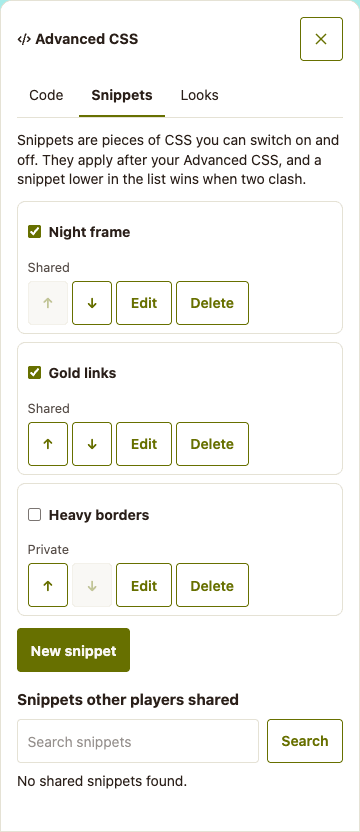
A snippet is a named piece of CSS you can switch on and off. Open Advanced CSS and pick the Snippets tab. It's the way to keep a few small tweaks apart, so you can turn one off to see what it was doing.
- New snippet takes a name, from 3 to 50 characters, and your CSS. You can keep up to 30, each up to 50,000 characters. The name Profile CSS belongs to the Code tab.
- The box beside a snippet's name switches it on or off. The arrows move it up or down, and Edit and Delete do what they say. Delete asks once more before it goes.
- Switched-on snippets run after your Advanced CSS, from the top of the list down. Where two clash, the lower one wins.
- Let other players use this snippet shares it. Other players find it under Snippets other players shared, search for it by name, and click Use. They see it on their profile the moment they do, and they follow your edits from then on.
The Custom CSS page has its own snippets. Those restyle Subeta for you and never touch your profile, so a snippet from there does nothing here.
Looks
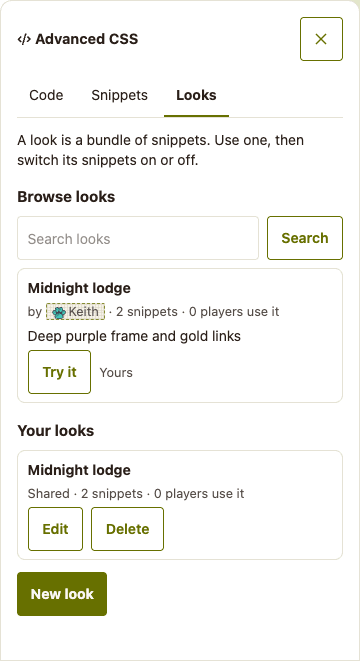
A look is a bundle of snippets, made by a player and shared. Open Advanced CSS and pick the Looks tab.
Using a look
- Browse looks lists the shared ones, with a search box. Try it shows a look on your profile without saving anything. Stop trying puts things back.
- Use this look adds all of its snippets, switched on, after the ones you already have.
- A look you use appears under Looks you use, with a switch for each of its snippets. Turn off the pieces you don't want and keep the rest.
- Stop using removes the look's snippets from your profile. A snippet you were already using on your own stays.
- When the look's author adds or removes a snippet, your profile follows. Your own switches stay where you put them.
Making a look
- New look needs at least one snippet of your own. Give it a name, from 3 to 50 characters, and a description, then tick the snippets it should hold. They run in the same order as your Snippets tab.
- A look holds up to 12 snippets, and you can make up to 10.
- Share this look with other players makes the look public. It also makes every snippet in it public, so the people who use it can load them.
- A snippet in a shared look can't go private. Make the look private first, or take the snippet out of it.
- If you delete a look, the people using it keep its snippets as their own.
Class reference
The page is nested like this. Every block is a
.profile-section, whatever it holds.
#profile-v3                     your whole profile
  .profile-header               the top card
    .profile-avatar-frame       your avatar
    .profile-username           your name
    .profile-title-badge        your job title
    .profile-status             your status line
    .profile-stats              the row of stats
      .profile-stat             one stat
    .profile-header-bio         your pinned intro
  .profile-body                 the columns (data-columns="1", "2", or "3")
    .profile-col-1              first column (also .profile-col-left)
    .profile-col-2              second column (also .profile-col-right)
    .profile-col-3              third column, Minimal view only
      .profile-section          one block
        .profile-section-header its title bar
          .section-title        the title text
        .profile-section-body   everything under the title
Targeting one block
Every block carries its type, so you can style all of one kind:
.profile-section[data-type="pets"] { /* your rules */ }
The types are profile, blank,
pets, outfits, wardrobe,
collections, wishlist,
shops, collectibles,
achievements, medals, garden,
forum_topics, forum_posts,
feed, friends, comments,
holiday, and image. A block with no frame
also has the class profile-section--frameless.
Blocks also carry their own id, which is how you style one of your
three wishlists differently from the other two. Right-click the block,
pick Inspect, and read the number off
data-blockid:
.profile-section[data-blockid="8412"] { /* your rules */ }Inside the blocks
| Block | Grid | Each item |
|---|---|---|
| Image | .profile-image-row | .profile-image, .profile-image-report |
| Pets | .pets-grid | .pet-card, .pet-name, .pet-species |
| Outfits | .outfits-grid | .outfit-card, .outfit-thumb, .outfit-name |
| Wardrobe | .wardrobe-section | .wardrobe-avatar, .wardrobe-items |
| Collections | .collections-grid | .collection-item, .collections-count |
| Achievements | .achievements-grid | .achievement-item |
| Medals | .medals-grid | .medal-item, .medal-img, .medal-name |
| Friends | .friends-grid | .friend-card, .friend-card--fav, .friend-name |
| Comments | .comment-list | .comment-item, .comment-avatar, .comment-username, .comment-text |
| Recent Topics / Posts | .forum-activity-list | .forum-activity-item, .forum-activity-title, .forum-activity-body |
| Garden | .garden-section | .garden-preview, .garden-name, .garden-stat |
| Activity | .profile-feed | .profile-feed-timeline, .profile-feed-tabs |
| Holiday | .holiday-section | .holiday-action, .holiday-btn |
Variables
Setting a variable on #profile-v3 beats writing rules for
every element that uses it.
| Variable | What it paints |
|---|---|
--color-primary | The accent: section headers, links, and borders. |
--profile-card-bg | The surface behind the header and every block. |
--profile-card-blur | Blur behind those surfaces, e.g. blur(6px). |
--profile-font | The font for everything in the profile. |
--color-base-content | Text color. |
--color-item-border | Borders between things. |
--profile-card-opacity | How solid the cards are, e.g. 80%. |
--profile-width | How wide your profile can get, e.g. 900px. |
--radius-lg | Corner rounding on cards. |
Examples
All of these go in the Code tab of Advanced CSS. Hit Preview before you save.
Two even columns
The right column is 292px by default. Make them match:
#profile-v3 .profile-body {
  grid-template-columns: 1fr 1fr;
}
A sidebar on each side
The three-column layout splits the page evenly. Narrow the outer two:
#profile-v3 .profile-body[data-columns="3"] {
  grid-template-columns: 240px 1fr 240px;
}
Give one wishlist its own color
Two Wishlist blocks, two accents. Swap in your own block ids:
.profile-section[data-blockid="8412"] {
  --color-primary: oklch(62% 0.16 25);
}
.profile-section[data-blockid="8413"] {
  --color-primary: oklch(62% 0.14 250);
}
Square off the cards
The Corners slider in Style does this without CSS. For the CSS:
#profile-v3 .profile-section,
#profile-v3 .profile-header {
  border-radius: 0;
}
A background image
Style has a Pictures group for this, which is the easier way. To
write it yourself, any image host works as long as the address
starts with https://.
body {
  background: url("https://example.com/stars.png") repeat fixed;
}
#main-content {
  background: transparent;
}
A Google font
The @import has to be the first line in the box.
@import url("https://fonts.googleapis.com/css2?family=Cormorant+Garamond&display=swap");

#profile-v3 {
  --profile-font: "Cormorant Garamond", serif;
}
Quiet the section headers
The Header style setting has four looks built in. If you want something else entirely:
#profile-v3 .profile-section-header {
  background: transparent;
  color: var(--color-base-content);
  border-bottom: 1px dashed var(--color-item-border);
  letter-spacing: 0.2em;
}
Stuck, or want something that isn't here?
Post in the Help forum for a hand with your CSS, or the Suggestions forum for a block or a setting you wish existed. We're reading both.